1909-powershell-get-command
1909-powershell-get-command
overview
- A Usage of get-command cmdlet

jupyter notebook
Usage
Get-Help
In [33]:
Get-Help Get-Command -online
In [1]:
Get-Help Get-Command | Out-String -Stream | Set -Name ary_str
In [2]:
$ary_str.Length
55
In [3]:
$ary_str[0..13]
NAME
    Get-Command

SYNOPSIS
    Gets all commands.


SYNTAX
    Get-Command [[-Name] <String[]>] [[-ArgumentList] <Object[]>] [-All] [-CommandType {Alias | Function | Filter |
    Cmdlet | ExternalScript | Application | Script | Workflow | Configuration | All}] [-FullyQualifiedModule
    <ModuleSpecification[]>] [-ListImported] [-Module <String[]>] [-ParameterName <String[]>] [-ParameterType
    <PSTypeName[]>] [-ShowCommandInfo] [-Syntax] [-TotalCount <Int32>] [<CommonParameters>]
In [4]:
get-help get-command | set -Name store
In [5]:
$store.GetType().Fullname
System.Management.Automation.PSCustomObject
In [6]:
$store | format-list *
examples      : @{example=System.Management.Automation.PSObject[]}
inputTypes    : @{inputType=@{type=@{name=System.String}; description=System.Management.Automation.PSObject[]}}
alertSet      : @{alert=System.Management.Automation.PSObject[]}
syntax        : @{syntaxItem=System.Management.Automation.PSObject[]}
parameters    : @{parameter=System.Management.Automation.PSObject[]}
details       : @{description=System.Management.Automation.PSObject[]; verb=Get; noun=Command; name=Get-Command}
description   : {@{Text=The Get-Command cmdlet gets all commands that are installed on the computer, including
                cmdlets, aliases, functions, workflows, filters, scripts, and applications. Get-Command gets the
                commands from Windows PowerShell modules and snap-ins and commands that were imported from other
                sessions. To get only commands that have been imported into the current session, use the ListImported
                parameter.
                }, @{Text=Without parameters, a Get-Command command gets all of the cmdlets, functions, workflows and
                aliases installed on the computer. A `Get-Command *` command gets all types of commands, including all
                of the non-Windows PowerShell files in the Path environment variable ($env:path), which it lists in
                the Application command type.
                }, @{Text=A Get-Command command that uses the exact name of the command, without wildcard characters,
                automatically imports the module that contains the command so that you can use the command
                immediately. To enable, disable, and configure automatic importing of modules, use the
                $PSModuleAutoLoadingPreference preference variable. For more information, see
                about_Preference_Variables (http://go.microsoft.com/fwlink/?LinkID=113248) in the Microsoft TechNet
                library. Get-Command gets its data directly from the command code, unlike Get-Help, which gets its
                information from help topics.
                }, @{Text=In Windows PowerShell 2.0, Get-Command gets only commands in current session. It does not
                get commands from modules that are installed, but not imported. To limit Get-Command in Windows
                PowerShell 3.0 and later versions to commands in the current session, use the ListImported parameter.
                }...}
relatedLinks  : @{navigationLink=System.Management.Automation.PSObject[]}
returnValues  : @{returnValue=System.Management.Automation.PSObject[]}
xmlns:maml    : http://schemas.microsoft.com/maml/2004/10
xmlns:command : http://schemas.microsoft.com/maml/dev/command/2004/10
xmlns:dev     : http://schemas.microsoft.com/maml/dev/2004/10
xmlns:MSHelp  : http://msdn.microsoft.com/mshelp
Name          : Get-Command
Category      : Cmdlet
Synopsis      : Gets all commands.
Component     :
Role          :
Functionality :
PSSnapIn      : Microsoft.PowerShell.Core
ModuleName    : Microsoft.PowerShell.Core
In [7]:
$store.description[0..10]
The Get-Command cmdlet gets all commands that are installed on the computer, including cmdlets, aliases, functions,
workflows, filters, scripts, and applications. Get-Command gets the commands from Windows PowerShell modules and
snap-ins and commands that were imported from other sessions. To get only commands that have been imported into the
current session, use the ListImported parameter.


Without parameters, a Get-Command command gets all of the cmdlets, functions, workflows and aliases installed on the
computer. A `Get-Command *` command gets all types of commands, including all of the non-Windows PowerShell files in
the Path environment variable ($env:path), which it lists in the Application command type.


A Get-Command command that uses the exact name of the command, without wildcard characters, automatically imports the
module that contains the command so that you can use the command immediately. To enable, disable, and configure
automatic importing of modules, use the $PSModuleAutoLoadingPreference preference variable. For more information, see
about_Preference_Variables (http://go.microsoft.com/fwlink/?LinkID=113248) in the Microsoft TechNet library.
Get-Command gets its data directly from the command code, unlike Get-Help, which gets its information from help topics.


In Windows PowerShell 2.0, Get-Command gets only commands in current session. It does not get commands from modules
that are installed, but not imported. To limit Get-Command in Windows PowerShell 3.0 and later versions to commands in
the current session, use the ListImported parameter.


Starting in Windows PowerShell 5.0, results of the Get-Command cmdlet display a Version column by default. A new
Version property has been added to the CommandInfo class.
In [8]:
$store.parameters
    -All [<SwitchParameter>]
        Indicates that this cmdlet gets all commands, including commands of the same type that have the same name. By
        default, Get-Command gets only the commands that run when you type the command name.

        For more information about the method that Windows PowerShell uses to select the command to run when multiple
        commands have the same name, see about_Command_Precedence (http://go.microsoft.com/fwlink/?LinkID=113214) in
        the TechNet library. For information about module-qualified command names and running commands that do not run
        by default because of a name conflict, see about_Modules (http://go.microsoft.com/fwlink/?LinkID=144311).

        This parameter was introduced in Windows PowerShell 3.0.

        In Windows PowerShell 2.0, Get-Command gets all commands by default.

        Required?                    false
        Position?                    named
        Default value                False
        Accept pipeline input?       True (ByPropertyName)
        Accept wildcard characters?  false

    -ArgumentList <Object[]>
        Specifies an array of arguments. This cmdlet gets information about a cmdlet or function when it is used with
        the specified parameters ("arguments"). The alias for ArgumentList is Args .

        To detect dynamic parameters that are available only when certain other parameters are used, set the value of
        ArgumentList to the parameters that trigger the dynamic parameters.

        To detect the dynamic parameters that a provider adds to a cmdlet, set the value of the ArgumentList parameter
        to a path in the provider drive, such as WSMan:, HKLM:, or Cert:. When the command is a Windows PowerShell
        provider cmdlet, enter only one path in each command. The provider cmdlets return only the dynamic parameters
        for the first path the value of ArgumentList . For information about the provider cmdlets, see about_Providers
        (http://go.microsoft.com/fwlink/?LinkID=113250) in the TechNet library.

        Required?                    false
        Position?                    1
        Default value                None
        Accept pipeline input?       False
        Accept wildcard characters?  false

    -CommandType <CommandTypes>
        Specifies the  types of commands that this cmdlet gets. Enter one or more command types. Use CommandType or
        its alias, Type . By default, Get-Command gets all cmdlets, functions, and workflows, and aliases.

        The acceptable values for this parameter are:

        - Alias. Gets the aliases of all Windows PowerShell commands. For more information, see about_Aliases.

        - All. Gets all command types. This parameter value is the equivalent of `Get-Command *`.

        - Application. Gets non-Windows-PowerShell files in paths listed in the Path environment variable ($env:path),
        including .txt, .exe, and .dll files. For more information about the Path environment variable, see
        about_Environment_Variables. - Cmdlet. Gets all cmdlets.

        - ExternalScript. Gets all .ps1 files in the paths listed in the Path environment variable ($env:path). -
        Filter and Function. Gets all Windows PowerShell advanced and simple functions and filters.

        - Script. Gets all script blocks. To get Windows PowerShell scripts (.ps1 files), use the ExternalScript value.

        - Workflow. Gets all workflows. For more information about workflows, see Introducing Windows PowerShell
        Workflow.

        Required?                    false
        Position?                    named
        Default value                None
        Accept pipeline input?       True (ByPropertyName)
        Accept wildcard characters?  false

    -FullyQualifiedModule <ModuleSpecification[]>
        Specifies modules with names that are specified in the form of ModuleSpecification objects, described by the
        Remarks section of Module Specification Constructor
        (Hashtable)http://msdn.microsoft.com/library/windows/desktop/jj136290(v=vs.85).aspx on the Microsoft Developer
        Network (MSDN). For example, the FullyQualifiedModule parameter accepts a module name that is specified in the
        format @{ModuleName = "modulename"; ModuleVersion = "version_number"} or @{ModuleName = "modulename";
        ModuleVersion = "version_number"; Guid = "GUID"}. ModuleName and ModuleVersion are required, but Guid is
        optional.

        You cannot specify the FullyQualifiedModule parameter in the same command as a Module parameter. The two
        parameters are mutually exclusive.

        Required?                    false
        Position?                    named
        Default value                None
        Accept pipeline input?       True (ByPropertyName)
        Accept wildcard characters?  false

    -ListImported [<SwitchParameter>]
        Indicates that this cmdlet gets only commands in the current session.

        Starting in Windows PowerShell 3.0, by default, Get-Command gets all installed commands, including, but not
        limited to, the commands in the current session. In Windows PowerShell 2.0, it gets only commands in the
        current session.

        This parameter was introduced in Windows PowerShell 3.0.

        Required?                    false
        Position?                    named
        Default value                False
        Accept pipeline input?       True (ByPropertyName)
        Accept wildcard characters?  false

    -Module <String[]>
        Specifies an array of modules. This cmdlet gets the commands that came from the specified modules or snap-ins.
        Enter the names of modules or snap-ins, or enter snap-in or module objects.

        This parameter takes string values, but the value of this parameter can also be a PSModuleInfo or PSSnapinInfo
        object, such as the objects that the Get-Module, Get-PSSnapin, and Import-PSSession cmdlets return.

        You can refer to this parameter by its name, Module , or by its alias, PSSnapin . The parameter name that you
        choose has no effect on the command output.

        Required?                    false
        Position?                    named
        Default value                None
        Accept pipeline input?       True (ByPropertyName)
        Accept wildcard characters?  false

    -Name <String[]>
        Specifies an array of names. This cmdlet gets only commands that have the specified name. Enter a name or name
        pattern. Wildcard characters are permitted.

        To get commands that have the same name, use the All parameter. When two commands have the same name, by
        default, Get-Command gets the command that runs when you type the command name.

        Required?                    false
        Position?                    0
        Default value                None
        Accept pipeline input?       True (ByPropertyName, ByValue)
        Accept wildcard characters?  false

    -Noun <String[]>
        Specifies an array of command nouns. This cmdlet gets commands, which include cmdlets, functions, workflows,
        and aliases, that have names that include the specified noun. Enter one or more nouns or noun patterns.
        Wildcard characters are permitted.

        Required?                    false
        Position?                    named
        Default value                None
        Accept pipeline input?       True (ByPropertyName)
        Accept wildcard characters?  false

    -ParameterName <String[]>
        Specifies an array of parameter names. This cmdlet gets commands in the session that have the specified
        parameters. Enter parameter names or parameter aliases. Wildcard characters are supported.

        The ParameterName and ParameterType parameters search only commands in the current session.

        This parameter was introduced in Windows PowerShell 3.0.

        Required?                    false
        Position?                    named
        Default value                None
        Accept pipeline input?       False
        Accept wildcard characters?  false

    -ParameterType <PSTypeName[]>
        Specifies an array of parameter names. This cmdlet gets commands in the session that have parameters of the
        specified type. Enter the full name or partial name of a parameter type. Wildcard characters are supported.

        The ParameterName and ParameterType parameters search only commands in the current session.

        This parameter was introduced in Windows PowerShell 3.0.

        Required?                    false
        Position?                    named
        Default value                None
        Accept pipeline input?       False
        Accept wildcard characters?  false

    -ShowCommandInfo [<SwitchParameter>]
        Indicates that this cmdlet displays command information.

        For more information about the method that Windows PowerShell uses to select the command to run when multiple
        commands have the same name, see about_Command_Precedence. For information about module-qualified command
        names and running commands that do not run by default because of a name conflict, see about_Modules.

        This parameter was introduced in Windows PowerShell 3.0.

        In Windows PowerShell 2.0, Get-Command gets all commands by default.

        Required?                    false
        Position?                    named
        Default value                False
        Accept pipeline input?       False
        Accept wildcard characters?  false

    -Syntax [<SwitchParameter>]
        Indicates that this cmdlet gets only the following specified data about the command:

        - Aliases. Gets the standard name.

        - Cmdlets. Gets the syntax.

        - Functions and filters. Gets the function definition.

        - Scripts and applications or files. Gets the path and filename.

        Required?                    false
        Position?                    named
        Default value                False
        Accept pipeline input?       True (ByPropertyName)
        Accept wildcard characters?  false

    -TotalCount <Int32>
        Specifies the number of commands to get. You can use this parameter to limit the output of a command.

        Required?                    false
        Position?                    named
        Default value                None
        Accept pipeline input?       True (ByPropertyName)
        Accept wildcard characters?  false

    -Verb <String[]>
        Specifies an array of command verbs. This cmdlet gets commands, which include cmdlets, functions, workflows,
        and aliases, that have names that include the specified verb. Enter one or more verbs or verb patterns.
        Wildcard characters are permitted.

        Required?                    false
        Position?                    named
        Default value                None
        Accept pipeline input?       True (ByPropertyName)
        Accept wildcard characters?  false

    <CommonParameters>
        This cmdlet supports the common parameters: Verbose, Debug,
        ErrorAction, ErrorVariable, WarningAction, WarningVariable,
        OutBuffer, PipelineVariable, and OutVariable. For more information, see
        about_CommonParameters (https:/go.microsoft.com/fwlink/?LinkID=113216).
Show-Commnad
In [9]:
Show-Command Get-Command
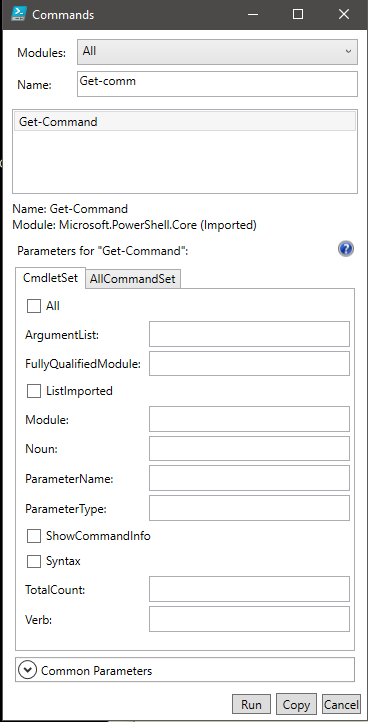
Get-Command
In [41]:
Get-Command -Noun Item | select Name | format-wide
Clear-Item                                                  Copy-Item
Get-Item                                                    Invoke-Item
Move-Item                                                   New-Item
Remove-Item                                                 Rename-Item
Set-Item
Get-Alias
In [10]:
get-alias | Out-String -stream | select-string 'command'
CommandType     Name                                               Version    Source
Alias           gcm -> Get-Command
Alias           icm -> Invoke-Command
Alias           shcm -> Show-Command
Alias           trcm -> Trace-Command
System.Management.Automation.CmdletInfo
In [11]:
(gcm get-item).GetType().Fullname
System.Management.Automation.CmdletInfo
In [12]:
gcm get-item | format-list *
gcm get-item | format-list *


HelpUri             : https://go.microsoft.com/fwlink/?LinkID=113319
DLL                 : C:\WINDOWS\Microsoft.Net\assembly\GAC_MSIL\Microsoft.PowerShell.Commands.Management\v4.0_3.0.0.0_
                      _31bf3856ad364e35\Microsoft.PowerShell.Commands.Management.dll
Verb                : Get
Noun                : Item
HelpFile            : Microsoft.PowerShell.Commands.Management.dll-Help.xml
PSSnapIn            :
Version             : 3.1.0.0
ImplementingType    : Microsoft.PowerShell.Commands.GetItemCommand
Definition          :
                      Get-Item [-Path] <string[]> [-Filter <string>] [-Include <string[]>] [-Exclude <string[]>]
                      [-Force] [-Credential <pscredential>] [-UseTransaction] [-Stream <string[]>] [<CommonParameters>]

                      Get-Item -LiteralPath <string[]> [-Filter <string>] [-Include <string[]>] [-Exclude <string[]>]
                      [-Force] [-Credential <pscredential>] [-UseTransaction] [-Stream <string[]>] [<CommonParameters>]

DefaultParameterSet : Path
OutputType          : {System.IO.FileInfo, System.Boolean, System.String, System.IO.FileInfo...}
Options             : ReadOnly
Name                : Get-Item
CommandType         : Cmdlet
Source              : Microsoft.PowerShell.Management
Visibility          : Public
ModuleName          : Microsoft.PowerShell.Management
Module              : Microsoft.PowerShell.Management
RemotingCapability  : PowerShell
Parameters          : {[Path, System.Management.Automation.ParameterMetadata], [LiteralPath,
                      System.Management.Automation.ParameterMetadata], [Filter,
                      System.Management.Automation.ParameterMetadata], [Include,
                      System.Management.Automation.ParameterMetadata]...}
ParameterSets       : {[-Path] <string[]> [-Filter <string>] [-Include <string[]>] [-Exclude <string[]>] [-Force]
                      [-Credential <pscredential>] [-UseTransaction] [-Stream <string[]>] [<CommonParameters>],
                      -LiteralPath <string[]> [-Filter <string>] [-Include <string[]>] [-Exclude <string[]>] [-Force]
                      [-Credential <pscredential>] [-UseTransaction] [-Stream <string[]>] [<CommonParameters>]}
Get-Verb
In [13]:
get-verb | set -Name ary_verb
get-verb | set -Name ary_verb
In [14]:
$ary_verb | where {$_.Group -eq 'Common'}
Verb     Group
----     -----
Add      Common
Clear    Common
Close    Common
Copy     Common
Enter    Common
Exit     Common
Find     Common
Format   Common
Get      Common
Hide     Common
Join     Common
Lock     Common
Move     Common
New      Common
Open     Common
Optimize Common
Pop      Common
Push     Common
Redo     Common
Remove   Common
Rename   Common
Reset    Common
Resize   Common
Search   Common
Select   Common
Set      Common
Show     Common
Skip     Common
Split    Common
Step     Common
Switch   Common
Undo     Common
Unlock   Common
Watch    Common
In [15]:
$ary_verb | where {$_.Group -eq 'Data'} | select Verb | format-wide
Backup                                                      Checkpoint
Compare                                                     Compress
Convert                                                     ConvertFrom
ConvertTo                                                   Dismount
Edit                                                        Expand
Export                                                      Group
Import                                                      Initialize
Limit                                                       Merge
Mount                                                       Out
Publish                                                     Restore
Save                                                        Sync
Unpublish                                                   Update
In [16]:
$ary_verb | where {$_.Group -eq 'LifeCycle'} | fw verb
Approve                                                     Assert
Complete                                                    Confirm
Deny                                                        Disable
Enable                                                      Install
Invoke                                                      Register
Request                                                     Restart
Resume                                                      Start
Stop                                                        Submit
Suspend                                                     Uninstall
Unregister                                                  Wait
In [17]:
$ary_verb | where {$_.Group -eq 'Diagnostic'} | fw verb
Debug                                                       Measure
Ping                                                        Repair
Resolve                                                     Test
Trace
In [18]:
$ary_verb | where {$_.Group -eq 'Communications'} | fw verb
Connect                                                     Disconnect
Read                                                        Receive
Send                                                        Write
In [19]:
$ary_verb | where {$_.Group -in @('security','other')} | fw verb
Block                                                       Grant
Protect                                                     Revoke
Unblock                                                     Unprotect
Use
Nouns
In [36]:
Get-Command | set -Name ary_cmd
Get-Verb | select Verb | foreach {$_.Verb}|set -Name ary_verb
$nouns = @(
  "Acl","Alias","Certificate","ChildItem","Clipboard",
  "Clixml","Command","Computer","ComputerInfo","Console",
  "Content","ControlPanelItem","Counter","Credential",
  "Csv","Culture","Custom","Date","Debug","Debugger",
  "DedupProperties","Default","Error","Event","EventLog",
  "ExecutionPolicy","Expression","File","FormatData","GridView",
  "Guid","Help","Hex","History","Host","HotFix","Html","Information",
  "InstalledModule","InstalledScript","IseSnippet","Item",
  "ItemProperty","ItemPropertyValue","Job","JobTrigger","Json",
  "List","LocalizedData","Location","MailMessage","Member",
  "Mock","Module","ModuleManifest","ModuleMember","Null","Object",
  "ObjectEvent","OdbcDriver","OdbcDsn","OdbcPerfCounter","Output",
  "PSBreakpoint","PSCallStack","PSDebug","PSDrive","PSSnapin",
  "Package","PackageProvider","PackageSource","Path","Pester","
  PesterOption","Process","Progress","Random","RecycleBin",
  "RestMethod","Script","ScriptFileInfo","SecureString",
  "Service","Sleep","String","StringData","Table","TemporaryFile",
  "TimeSpan","TimeZone","Trace","TraceSource","Transaction",
  "Transcript","TroubleshootingPack","Type","TypeData",
  "UICulture","Unique","Variable","Verb","Verbose","Warning",
  "WebRequest","WebServiceProxy","Wide","WinEvent",
  "WinHomeLocation","WindowsEdition","WmiEvent","WmiInstance",
  "WmiMethod","WmiObject","Xml"
)
Get-Command | set -Name ary_cmd
Get-Verb | select Verb | foreach {$_.Verb}|set -Name ary_verb
$nouns = @(
>>   "Acl","Alias","Certificate","ChildItem","Clipboard",
>>   "Clixml","Command","Computer","ComputerInfo","Console",
>>   "Content","ControlPanelItem","Counter","Credential",
>>   "Csv","Culture","Custom","Date","Debug","Debugger",
>>   "DedupProperties","Default","Error","Event","EventLog",
>>   "ExecutionPolicy","Expression","File","FormatData","GridView",
>>   "Guid","Help","Hex","History","Host","HotFix","Html","Information",
>>   "InstalledModule","InstalledScript","IseSnippet","Item",
>>   "ItemProperty","ItemPropertyValue","Job","JobTrigger","Json",
>>   "List","LocalizedData","Location","MailMessage","Member",
>>   "Mock","Module","ModuleManifest","ModuleMember","Null","Object",
>>   "ObjectEvent","OdbcDriver","OdbcDsn","OdbcPerfCounter","Output",
>>   "PSBreakpoint","PSCallStack","PSDebug","PSDrive","PSSnapin",
>>   "Package","PackageProvider","PackageSource","Path","Pester","
>>   PesterOption","Process","Progress","Random","RecycleBin",
>>   "RestMethod","Script","ScriptFileInfo","SecureString",
>>   "Service","Sleep","String","StringData","Table","TemporaryFile",
>>   "TimeSpan","TimeZone","Trace","TraceSource","Transaction",
>>   "Transcript","TroubleshootingPack","Type","TypeData",
>>   "UICulture","Unique","Variable","Verb","Verbose","Warning",
>>   "WebRequest","WebServiceProxy","Wide","WinEvent",
>>   "WinHomeLocation","WindowsEdition","WmiEvent","WmiInstance",
>>   "WmiMethod","WmiObject","Xml"
>> )
>>
In [37]:
$ary = @()
$dic = @{}
$arylist = New-Object System.Collections.ArrayList
$arylist.Clear()

foreach($ar in $ary_cmd)
{
  $buf = $ar -split '-'
  if($buf[0] -in $ary_verb)
  {
    $null = $arylist.Add(@($buf[0], $buf[1]))
    # $buf[0] + ' : ' + $buf[1]
  }
}
Get-Command | set -Name ary_cmd
In [22]:
$i = 0
foreach($a in $arylist)
{
  if($a[1] -in $nouns){
    if($a[1] -in $dic.Keys)
    {
      $dic[$a[1]] += $a[0]
    }else{
      $dic[$a[1]] = @()
      $dic[$a[1]] += $a[0]
    }
    $i++
    # if($i -gt 100){break}
  }
}
$i = 0
foreach($a in $arylist)
In [23]:
$dic.GetEnumerator() |
    Sort-Object { $_.key } |
    select key, value | set -Name ordered
>> {
>>   if($a[1] -in $nouns){
>>     if($a[1] -in $dic.Keys)
>>     {
>>       $dic[$a[1]] += $a[0]
>>     }else{
>>       $dic[$a[1]] = @()
>>       $dic[$a[1]] += $a[0]
>>     }
>>     $i++
>>     # if($i -gt 100){break}
>>   }
>> }
>>
$dic.GetEnumerator() |
>>     Sort-Object { $_.key } |
>>     select key, value | set -Name ordered
>>
In [24]:
$ordered[0..26]
Key              Value
---              -----
Acl              {Get, Set}
Alias            {Export, Get, Import, New...}
Certificate      {Export, Get, Import, Switch...}
ChildItem        {Get}
Clipboard        {Get, Set}
Clixml           {Export, Import}
Command          {Find, Get, Invoke, Measure...}
Computer         {Add, Checkpoint, Remove, Rename...}
ComputerInfo     {Get}
Console          {Export}
Content          {Add, Clear, Get, Set}
ControlPanelItem {Get, Show}
Counter          {Export, Get, Import}
Credential       {Get}
Csv              {ConvertFrom, ConvertTo, Export, Import}
Culture          {Get, Set}
Custom           {Format}
Date             {Get, Set}
Debug            {Write}
Debugger         {Wait}
DedupProperties  {Get}
Default          {Out}
Error            {Write}
Event            {Get, New, Remove, Unregister...}
EventLog         {Clear, Get, Limit, New...}
ExecutionPolicy  {Get, Set}
Expression       {Invoke}
In [25]:
$ordered[27..77]
Key               Value
---               -----
File              {Out, Unblock}
FormatData        {Export, Get, Update}
GridView          {Out}
Guid              {New}
Help              {Get, Save, Update}
Hex               {Format}
History           {Add, Clear, Get, Invoke}
Host              {Clear, Get, Out, Read...}
HotFix            {Get}
Html              {ConvertTo}
Information       {Write}
InstalledModule   {Get}
InstalledScript   {Get}
IseSnippet        {Get, Import, New}
Item              {Clear, Copy, Get, Invoke...}
ItemProperty      {Clear, Copy, Get, Move...}
ItemPropertyValue {Get}
Job               {Debug, Get, Receive, Remove...}
JobTrigger        {Add, Disable, Enable, Get...}
Json              {ConvertFrom, ConvertTo}
List              {Format, Update}
LocalizedData     {Import}
Location          {Get, Pop, Push, Set}
MailMessage       {Send}
Member            {Add, Get}
Mock              {Invoke}
Module            {Find, Install, Publish, Save...}
ModuleManifest    {Update, New, Test}
ModuleMember      {Export}
Null              {Out}
Object            {Compare, Group, Measure, New...}
ObjectEvent       {Register}
OdbcDriver        {Get, Set}
OdbcDsn           {Add, Get, Remove, Set}
OdbcPerfCounter   {Disable, Enable, Get}
Output            {Write}
Package           {Find, Get, Install, Save...}
PackageProvider   {Find, Get, Import, Install}
PackageSource     {Get, Register, Set, Unregister}
Path              {Convert, Join, Resolve, Split...}
Pester            {Invoke}
Process           {Debug, Get, Start, Stop...}
Progress          {Write}
PSBreakpoint      {Disable, Enable, Get, Remove...}
PSCallStack       {Get}
PSDebug           {Set}
PSDrive           {Get, New, Remove}
PSSnapin          {Add, Get, Remove}
Random            {Get}
RecycleBin        {Clear}
RestMethod        {Invoke}
In [26]:
$ordered[78..$ordered.Length]
Key                 Value
---                 -----
Script              {Find, Install, Publish, Save...}
ScriptFileInfo      {New, Test, Update}
SecureString        {ConvertFrom, ConvertTo}
Service             {Get, New, Restart, Resume...}
Sleep               {Start}
String              {ConvertFrom, Convert, Out, Select}
StringData          {ConvertFrom}
Table               {Format}
TemporaryFile       {New}
TimeSpan            {New}
TimeZone            {Get, Set}
Trace               {Start, Stop, Export}
TraceSource         {Get, Set}
Transaction         {Complete, Get, Start, Undo...}
Transcript          {Start, Stop}
TroubleshootingPack {Get, Invoke}
Type                {Add}
TypeData            {Get, Remove, Update}
UICulture           {Get}
Unique              {Get}
Variable            {Clear, Get, New, Remove...}
Verb                {Get}
Verbose             {Write}
Warning             {Write}
WebRequest          {Invoke}
WebServiceProxy     {New}
Wide                {Format}
WindowsEdition      {Get, Set}
WinEvent            {Get, New}
WinHomeLocation     {Get, Set}
WmiEvent            {Register}
WmiInstance         {Set}
WmiMethod           {Invoke}
WmiObject           {Get, Remove}
Xml                 {ConvertTo, Select}
Get-Command and modules
In [27]:
get-module | ft Name, ModuleType, ExportedCommands
Name                            ModuleType ExportedCommands
----                            ---------- ----------------
Microsoft.PowerShell.Management   Manifest {[Add-Computer, Add-Computer], [Add-Content, Add-Content], [Checkpoint-Co...
Microsoft.PowerShell.Utility      Manifest {[Add-Member, Add-Member], [Add-Type, Add-Type], [Clear-Variable, Clear-V...
PSReadline                          Script {[Get-PSReadlineKeyHandler, Get-PSReadlineKeyHandler], [Get-PSReadlineOpt...
In [28]:
get-command -Module *.powershell.management | fw Name
Add-Computer                                                Add-Content
Checkpoint-Computer                                         Clear-Content
Clear-EventLog                                              Clear-Item
Clear-ItemProperty                                          Clear-RecycleBin
Complete-Transaction                                        Convert-Path
Copy-Item                                                   Copy-ItemProperty
Debug-Process                                               Disable-ComputerRestore
Enable-ComputerRestore                                      Get-ChildItem
Get-Clipboard                                               Get-ComputerInfo
Get-ComputerRestorePoint                                    Get-Content
Get-ControlPanelItem                                        Get-EventLog
Get-HotFix                                                  Get-Item
Get-ItemProperty                                            Get-ItemPropertyValue
Get-Location                                                Get-Process
Get-PSDrive                                                 Get-PSProvider
Get-Service                                                 Get-TimeZone
Get-Transaction                                             Get-WmiObject
Invoke-Item                                                 Invoke-WmiMethod
Join-Path                                                   Limit-EventLog
Move-Item                                                   Move-ItemProperty
New-EventLog                                                New-Item
New-ItemProperty                                            New-PSDrive
New-Service                                                 New-WebServiceProxy
Pop-Location                                                Push-Location
Register-WmiEvent                                           Remove-Computer
Remove-EventLog                                             Remove-Item
Remove-ItemProperty                                         Remove-PSDrive
Remove-WmiObject                                            Rename-Computer
Rename-Item                                                 Rename-ItemProperty
Reset-ComputerMachinePassword                               Resolve-Path
Restart-Computer                                            Restart-Service
Restore-Computer                                            Resume-Service
Set-Clipboard                                               Set-Content
Set-Item                                                    Set-ItemProperty
Set-Location                                                Set-Service
Set-TimeZone                                                Set-WmiInstance
Show-ControlPanelItem                                       Show-EventLog
Split-Path                                                  Start-Process
Start-Service                                               Start-Transaction
Stop-Computer                                               Stop-Process
Stop-Service                                                Suspend-Service
Test-ComputerSecureChannel                                  Test-Connection
Test-Path                                                   Undo-Transaction
Use-Transaction                                             Wait-Process
Write-EventLog
In [29]:
Get-Command -module Microsoft.PowerShell.Utility -CommandTYpe cmdlet | fw Name
Add-Member                                                  Add-Type
Clear-Variable                                              Compare-Object
ConvertFrom-Csv                                             ConvertFrom-Json
ConvertFrom-String                                          ConvertFrom-StringData
Convert-String                                              ConvertTo-Csv
ConvertTo-Html                                              ConvertTo-Json
ConvertTo-Xml                                               Debug-Runspace
Disable-PSBreakpoint                                        Disable-RunspaceDebug
Enable-PSBreakpoint                                         Enable-RunspaceDebug
Export-Alias                                                Export-Clixml
Export-Csv                                                  Export-FormatData
Export-PSSession                                            Format-Custom
Format-List                                                 Format-Table
Format-Wide                                                 Get-Alias
Get-Culture                                                 Get-Date
Get-Event                                                   Get-EventSubscriber
Get-FormatData                                              Get-Host
Get-Member                                                  Get-PSBreakpoint
Get-PSCallStack                                             Get-Random
Get-Runspace                                                Get-RunspaceDebug
Get-TraceSource                                             Get-TypeData
Get-UICulture                                               Get-Unique
Get-Variable                                                Group-Object
Import-Alias                                                Import-Clixml
Import-Csv                                                  Import-LocalizedData
Import-PSSession                                            Invoke-Expression
Invoke-RestMethod                                           Invoke-WebRequest
Measure-Command                                             Measure-Object
New-Alias                                                   New-Event
New-Object                                                  New-TimeSpan
New-Variable                                                Out-File
Out-GridView                                                Out-Printer
Out-String                                                  Read-Host
Register-EngineEvent                                        Register-ObjectEvent
Remove-Event                                                Remove-PSBreakpoint
Remove-TypeData                                             Remove-Variable
Select-Object                                               Select-String
Select-Xml                                                  Send-MailMessage
Set-Alias                                                   Set-Date
Set-PSBreakpoint                                            Set-TraceSource
Set-Variable                                                Show-Command
Sort-Object                                                 Start-Sleep
Tee-Object                                                  Trace-Command
Unblock-File                                                Unregister-Event
Update-FormatData                                           Update-List
Update-TypeData                                             Wait-Debugger
Wait-Event                                                  Write-Debug
Write-Error                                                 Write-Host
Write-Information                                           Write-Output
Write-Progress                                              Write-Verbose
Write-Warning
In [30]:
Get-Command -verb out | ft Name, Source
Get-Command  -verb out | ft Name, Source

Name         Source
----         ------
Out-Default  Microsoft.PowerShell.Core
Out-File     Microsoft.PowerShell.Utility
Out-GridView Microsoft.PowerShell.Utility
Out-Host     Microsoft.PowerShell.Core
Out-Null     Microsoft.PowerShell.Core
Out-Printer  Microsoft.PowerShell.Utility
Out-String   Microsoft.PowerShell.Utility
In [31]:
Get-Command -verb write | ft Name, Source
Name                              Source
----                              ------
Write-FileSystemCache             Storage
Write-DtcTransactionsTraceSession MsDtc
Write-PrinterNfcTag               PrintManagement
Write-VolumeCache                 Storage
Write-Debug                       Microsoft.PowerShell.Utility
Write-Error                       Microsoft.PowerShell.Utility
Write-EventLog                    Microsoft.PowerShell.Management
Write-Host                        Microsoft.PowerShell.Utility
Write-Information                 Microsoft.PowerShell.Utility
Write-Output                      Microsoft.PowerShell.Utility
Write-Progress                    Microsoft.PowerShell.Utility
Write-Verbose                     Microsoft.PowerShell.Utility
Write-Warning                     Microsoft.PowerShell.Utility
Appendix
In [32]:
Get-Help Get-Command
NAME
    Get-Command

SYNOPSIS
    Gets all commands.


SYNTAX
    Get-Command [[-Name] <String[]>] [[-ArgumentList] <Object[]>] [-All] [-CommandType {Alias | Function | Filter |
    Cmdlet | ExternalScript | Application | Script | Workflow | Configuration | All}] [-FullyQualifiedModule
    <ModuleSpecification[]>] [-ListImported] [-Module <String[]>] [-ParameterName <String[]>] [-ParameterType
    <PSTypeName[]>] [-ShowCommandInfo] [-Syntax] [-TotalCount <Int32>] [<CommonParameters>]

    Get-Command [[-ArgumentList] <Object[]>] [-All] [-FullyQualifiedModule <ModuleSpecification[]>] [-ListImported]
    [-Module <String[]>] [-Noun <String[]>] [-ParameterName <String[]>] [-ParameterType <PSTypeName[]>]
    [-ShowCommandInfo] [-Syntax] [-TotalCount <Int32>] [-Verb <String[]>] [<CommonParameters>]


DESCRIPTION
    The Get-Command cmdlet gets all commands that are installed on the computer, including cmdlets, aliases,
    functions, workflows, filters, scripts, and applications. Get-Command gets the commands from Windows PowerShell
    modules and snap-ins and commands that were imported from other sessions. To get only commands that have been
    imported into the current session, use the ListImported parameter.

    Without parameters, a Get-Command command gets all of the cmdlets, functions, workflows and aliases installed on
    the computer. A `Get-Command *` command gets all types of commands, including all of the non-Windows PowerShell
    files in the Path environment variable ($env:path), which it lists in the Application command type.

    A Get-Command command that uses the exact name of the command, without wildcard characters, automatically imports
    the module that contains the command so that you can use the command immediately. To enable, disable, and
    configure automatic importing of modules, use the $PSModuleAutoLoadingPreference preference variable. For more
    information, see about_Preference_Variables (http://go.microsoft.com/fwlink/?LinkID=113248) in the Microsoft
    TechNet library. Get-Command gets its data directly from the command code, unlike Get-Help, which gets its
    information from help topics.

    In Windows PowerShell 2.0, Get-Command gets only commands in current session. It does not get commands from
    modules that are installed, but not imported. To limit Get-Command in Windows PowerShell 3.0 and later versions to
    commands in the current session, use the ListImported parameter.

    Starting in Windows PowerShell 5.0, results of the Get-Command cmdlet display a Version column by default. A new
    Version property has been added to the CommandInfo class.


RELATED LINKS
    Online Version: http://go.microsoft.com/fwlink/?LinkId=821482
    Get-Help

REMARKS
    To see the examples, type: "get-help Get-Command -examples".
    For more information, type: "get-help Get-Command -detailed".
    For technical information, type: "get-help Get-Command -full".
    For online help, type: "get-help Get-Command -online"
</div>

Quote saved.
Login to quote this blog
Failed to save quote. Please try again later.
You cannot quote because this article is private.